Wispr Flow Alternatives: 7 Desktop Dictation Apps Compared on Price, Privacy and Where the Text Goes
A Wispr Flow alternative is any desktop app that turns a held shortcut into clean, punctuated text at your cursor. The seven apps below cover Mac only tools, Windows friendly tools, cloud engines, and fully local ones. They split on four things: what they cost, which systems they run on, whether your audio is kept, and whether your words survive after they land.
Every app in this roundup does the same core thing: hold a key, speak, get text.
Why People Go Looking for a Wispr Flow Alternative
Wispr Flow works. That is not the problem. People leave for reasons that have almost nothing to do with accuracy.
The first reason is the bill. Wispr Flow lists Pro at $15 per user each month, or $12 per user each month when you pay for the year. That is $144 a year on the vendor pricing page. The free plan caps desktop use at 2,000 words a week, which is roughly one long email a day.
The second reason is where the words go for processing. Wispr Flow sends your speech to its servers. For most work that is fine. For client notes, patient details, or anything under an NDA, a round trip to a vendor server is a conversation you may not want to have with your security team.
The third reason is habit. Once you get used to talking to your computer instead of typing, you use it for everything. At that point a per seat subscription starts to feel like renting a keyboard. People who dictate all day tend to want to buy the tool once.
The fourth reason is speed math. Comfortable typing sits near 40 words a minute for most people, and comfortable speech runs closer to 150. If you want the numbers behind that gap, the average typing speed breakdown covers it. The gap is why the category exists, and it is also why people shop hard for the right tool.
The fifth reason shows up last and bothers people most. You dictate hundreds of good sentences a week into other people's apps, and then they are gone. The words live in a Slack thread, a ticket comment, or a sent folder. Almost no tool in this category treats your own output as something worth keeping, and almost no review of these tools asks about it.
Dictation Apps and Meeting Recorders Do Different Jobs
Half the Wispr Flow competitors you will find in a search are not competitors at all. They are meeting tools wearing the same label.
One popular ranked list of the best Wispr Flow alternatives puts Notta and Otter.ai in the same lineup as Superwhisper and MacWhisper. Those two products do good work. They just do a different job.
A meeting recorder joins a call from your calendar, listens to everyone, and hands you a transcript and a summary afterwards. You read the output later. A dictation app waits for you to hold a key, listens only to you, and drops finished text into the field you were already typing in. You read the output right now, in the app you are working in.
Judging one by the other's yardstick gets you a bad recommendation. If your real need is call notes, pick a recorder. If your real need is writing faster in Slack, Gmail, Jira, and your editor, you want a hold to dictate app, and the rest of this article is about those.
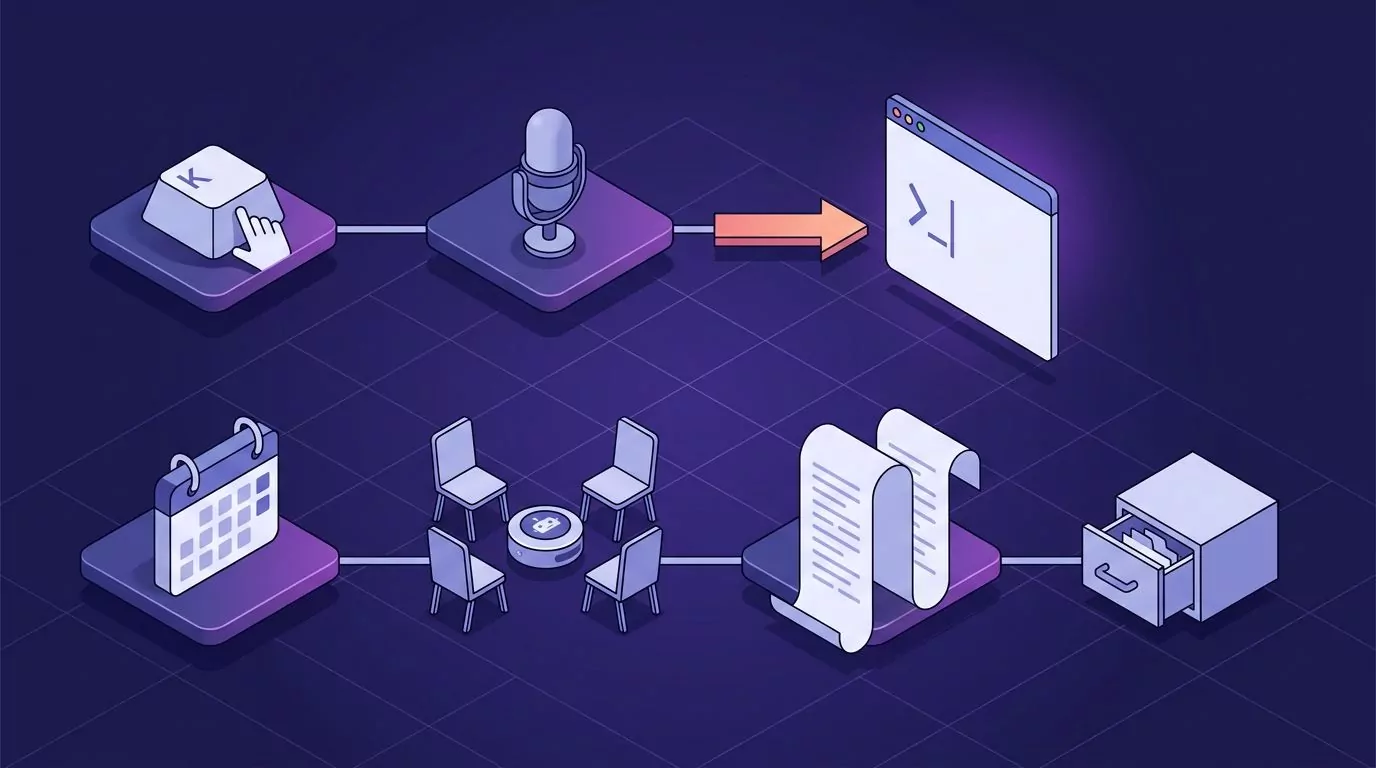
Two different pipelines. The top lane ends at your cursor. The bottom lane ends in an archive you read later.
One app genuinely sits in both lanes. Letterly runs on iPhone, Android, Mac, Windows, and the web, and it does dictation into other apps, meeting capture, file uploads, and AI rewrites in one product. If you want a single subscription for both jobs across a phone and a laptop, it is a fair pick. If you only ever hold a key at a desk, it is more app than you need.
Wispr Flow Competitors at a Glance
This table is the short version. Prices come from each vendor's own pricing page at the time of writing, and vendors change them often.
App |
macOS |
Windows |
How you start it |
Where speech is processed |
What happens to the audio |
Text kept and searchable |
Price model |
|---|---|---|---|---|---|---|---|
Wispr Flow |
Yes |
Yes |
Hold a key |
Cloud |
Retention set in Data and Privacy |
Yes, dictation history |
$15 a month, $12 a month yearly |
Superwhisper |
Yes |
Yes |
Hold a key |
Local models, cloud optional |
Recordings stay until you clear them |
Yes, searchable history |
$8.49 a month or $249.99 once |
MacWhisper |
Yes |
No |
Hold a key |
Local |
Stays on your Mac |
File transcripts saved as documents |
Free, or 64 euros once for Pro |
VoiceInk |
Yes, Apple silicon |
No |
Hold a key |
Local |
Stays on your Mac |
Not stated on the vendor page |
$29 once for one device |
Willow |
Yes |
Yes |
Hold a key |
Cloud by default, optional Offline Mode on Mac and iOS |
Willow claims none is stored on a server, with enforced zero retention on the Business plan |
Not stated on the pricing page |
$15 a month, $12 a month yearly |
LumeVoice |
Yes |
Waitlist only |
Hold a key |
Cloud, no cloud retention claimed |
Vendor claims none is kept |
Yes, history stays on device |
Free tier, or $249 once |
Snaply |
Yes |
No |
Hold a key |
Local, works offline |
Snaply says nothing leaves your Mac |
Local history, no search documented |
Free for one person |
VoiceSnap Pro |
Waitlist only |
Waitlist only |
Hold a key |
Cloud |
Discarded after transcription |
Yes, full text note search |
$39 once, early access |
The Seven Alternatives, One at a Time
These are ordered by what they are good at, not by a score. Read the two or three that match your setup and skip the rest.
Superwhisper: the strongest all round swap
If you want the closest like for like trade, Superwhisper is it. It runs on macOS, Windows, and iOS, and on Apple silicon it can run speech models on your own machine. That means dictation keeps working on a plane.
Its signature feature is modes. You write a short instruction for each context, and the app reshapes the output to match. A Slack mode stays loose. An email mode writes full sentences. That is real control, and it is the main thing Wispr Flow does not give you.
The history window is the best in this group. You can filter past dictations, search them by what you actually said, and run an old recording through a different mode. Pricing is $8.49 a month, or $249.99 once for a lifetime licence. The one time price is high, but it beats two years of most subscriptions.
Where it is weaker: modes are a setup task. If you want something that is right out of the box with no tuning, Wispr Flow still wins on that one point.
MacWhisper: the Mac tool that also handles files
MacWhisper started as a file transcription app and grew a system wide dictation mode. It runs local models, so nothing leaves your Mac. Pro is 64 euros once with lifetime updates, and there is a free tier that is genuinely useful.
Pick it when you have two jobs: dictating into apps and turning recorded audio into text. Few tools in this roundup do the second job well.
Where it is weaker: it is macOS only, with no Windows build at all. It is also not the fastest at the pure dictation task, because that is not what it was built for first.
VoiceInk: open source, one small payment
VoiceInk is the cheapest serious option here. It processes everything on your Mac, and the code is public on GitHub, so you can read it or build it yourself. Paid builds start at $29 once for one device, $49 for two, and $69 for three.
It needs Apple silicon and macOS 14.4 or later. That is a real limit if you are on an older Intel Mac. It is also the tool developers reach for most often, since local models handle terminal and code context without a network hop. If that is your use case, the notes on what voice coding actually does well are worth a read before you commit.
Where it is weaker: the vendor page says nothing about keeping a searchable record of what you dictated. Assume the text goes to your cursor and that is that.
Willow: cloud dictation with a real Windows build
Willow is the closest match to Wispr Flow's shape. It runs on Mac, Windows, and iOS, with Android listed as coming. Processing runs in the cloud by default, so accuracy is strong and setup is quick. There is also an Offline Mode you switch on in settings, which runs a dictation entirely on your device. Willow documents that mode for Mac and iOS, not for Windows.
On retention, Willow does answer the question. Its comparison page says zero data retention means your dictation never gets stored on any server. Read the tier list before you lean on that, because the enforced privacy mode with zero data retention is a Business plan line at $35 a month.
The free plan gives you a weaker model with no weekly word cap, which is more generous than a hard 2,000 word limit. Individual Pro is $15 a month, or $12 a month billed yearly, which is the same shape as the tool you are leaving.
Where it is weaker: the price is a straight swap, not a saving. If your reason for leaving Wispr Flow was the subscription, Willow does not solve it.
LumeVoice: strong Mac app, Windows still pending
LumeVoice is live on macOS, iPhone, and Android, with Windows shown as launching soon behind a waitlist. It offers a free tier of 2,000 words a month and a $249 lifetime licence.
Its clearest selling point is retention. The vendor states that your dictation history stays on your device and that nothing is retained in its cloud. For a cloud powered app, that is a stronger promise than most make.
Where it is weaker: if you are reading this because Wispr Flow felt wrong on Windows, LumeVoice cannot help you today. A waitlist is not a Windows app.
Snaply: the best free Wispr Flow alternative on a Mac
Snaply is free for individuals with no account and no trial timer. Everything runs on your Mac, so it works offline, and it covers 25 languages. It also does meeting notes, which pushes it into both lanes described earlier.
Snaply says your voice recordings, text, and meetings never leave your Mac. Its docs describe a local history of recent transcriptions you can reread, copy, or replay, with the audio auto cleared after 7 days. Nothing on the vendor site describes searching that history by phrase, and the vendor page does not say where those files sit on disk.
Where it is weaker: macOS only, and it is young. Free with no paid tier for individuals also means no contract holding the vendor to a support promise.
VoiceSnap Pro: cross platform, and the text stays searchable
VoiceSnap Pro is built for both macOS and Windows, which most of this list is not. You put the cursor in any text field, hold your chosen shortcut, speak, and release. Punctuated text appears at the cursor with filler words like "um" removed. The app you were in never loses focus.
The part no other tool here treats as a headline feature is what happens next. Every dictation is saved as a note, tagged with the app you dictated into and the time. You can search the whole library by any phrase you said, browse by day and by app, and export a note, a day, or everything as plain text or Markdown.
Audio is transcribed and then discarded. There is no playback and no stored recording, so there is no audio archive to leak, subpoena, or clean up later. Pricing is $39 one time for early access.
Where it is weaker: it is pre launch. There is no download yet, only a waitlist, so you cannot test it this afternoon the way you can test Snaply or Superwhisper. Transcription happens in the cloud, so it is not the pick if you need offline or fully local processing. There are no mobile apps, no Linux build, and no team features.
An independent walkthrough of three of these apps, plus Spokenly, useful if you want to watch the insert at cursor behaviour before you buy.
The Windows Problem With Most Wispr Flow Alternatives
Here is the thing the ranking pages bury. Search for the best Wispr Flow alternatives and the top picks are usually MacWhisper, VoiceInk, Snaply, and other Mac only apps. If you are on Windows, most of that advice is dead on arrival.

Most of the commonly recommended alternatives to Wispr Flow never cross to Windows.
Of the seven apps above, only two ship a Windows build you can download today: Superwhisper and Willow. LumeVoice and VoiceSnap Pro both list Windows, but both are waitlist only for now. MacWhisper, VoiceInk, and Snaply are Mac only and say so plainly. Only one of those two keeps speech on the machine when you are on Windows. Superwhisper ships on device models for Windows and states that your audio never leaves your computer. Willow's Offline Mode is documented for Mac and iOS, so on a PC Willow is cloud dictation.
There is a second gap worth knowing about. The one roundup that publishes measured numbers for latency, word error rate, and peak memory ran every test on Mac hardware. So the benchmark tables you will find are Mac tables. Nobody on this topic has published comparable Windows figures, which means Windows buyers are choosing on marketing copy.
Before you pay anything, try the free baseline. Windows has voice typing built in on the Win and H shortcut, and it is better than its reputation. Our guide to what Win and H does and where it stops walks through the limits you will hit. If those limits do not bother you, you have found a free answer.
Mac users have the same free starting point in Apple Dictation. The setup and the shortcut choices are covered in our guide to dictating on a Mac in any app.
Subscription or One Time: What Two Years Actually Costs
This is the argument driving most of the search traffic for Wispr Flow pricing, so it deserves real numbers rather than a shrug.

A subscription keeps climbing for as long as you dictate. A one time licence stops on day one.
Over two years, at each vendor's listed rate:
Wispr Flow Pro, billed yearly: about $288
Willow Individual Pro, billed yearly: about $288
Superwhisper monthly: about $204, or $249.99 once for lifetime
LumeVoice lifetime: $249 once
MacWhisper Pro: 64 euros once
VoiceSnap Pro early access: $39 once
VoiceInk Solo: $29 once
Snaply: free
Read that list carefully before you conclude that one time always wins. A $249 lifetime licence takes about twenty months to beat a $12 a month plan. If you are still deciding whether dictation fits your work at all, a month of a subscription is the cheaper experiment.
The honest split is this. Subscriptions buy you a team that keeps shipping models, and you can walk away in a month. One time licences buy you a fixed cost and the risk that the app stops getting updates. Neither is the smart choice in the abstract. It depends on how sure you are that you will still be dictating in a year.
What Happens to Your Dictations After the Text Lands
Every ranking page on this topic judges tools on accuracy, price, and local versus cloud. Almost none of them ask the question that matters a month later: where did all those words go?
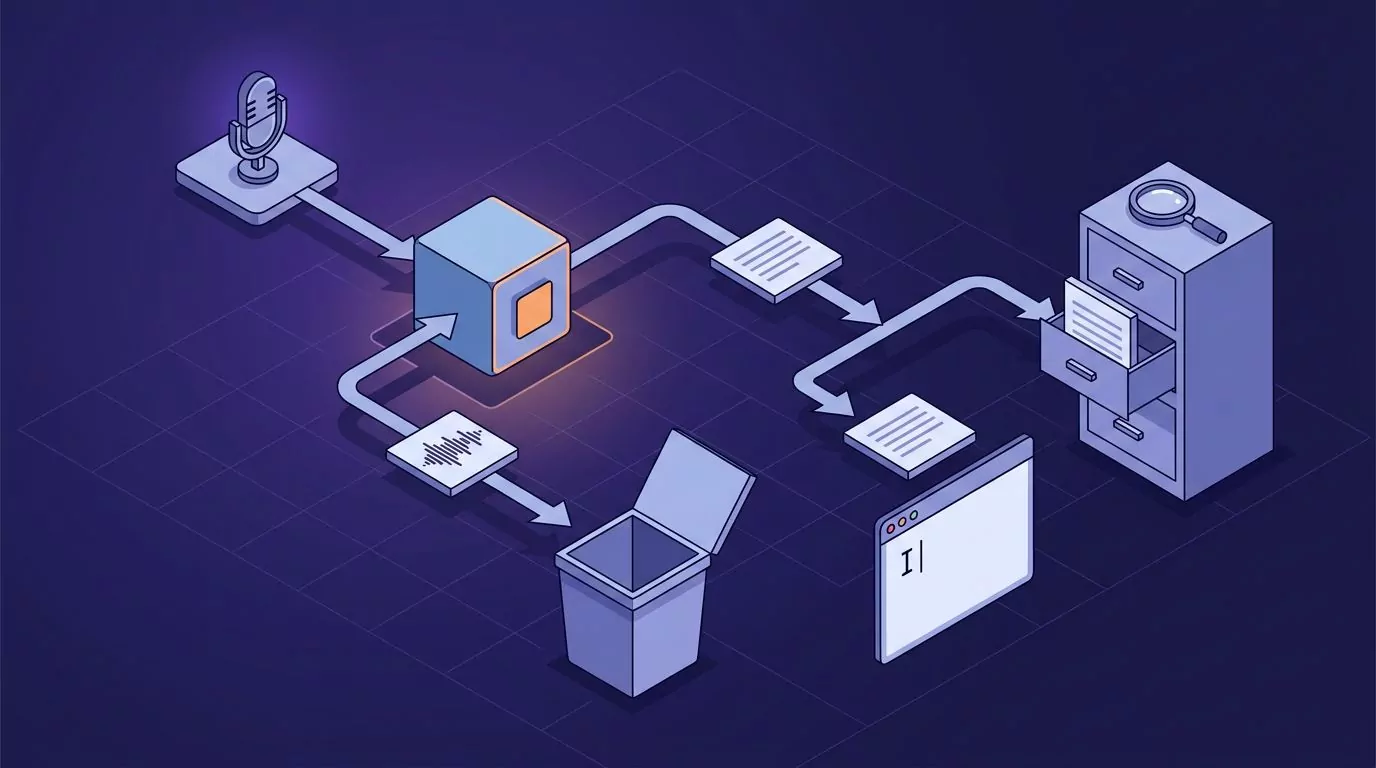
Two things leave the microphone. Ask each vendor what happens to both of them.
There are really two questions, and vendors answer them separately.
Question one: is the audio kept? Wispr Flow puts this under Data and Privacy on its data controls page, where cloud storage of your transcription data can be turned off. Automatic deletion of transcripts is off by default, so you have to go and set it.
Superwhisper stores recordings on your machine and does not clear them for you, which is fine until your disk fills. Snaply says nothing you record leaves your Mac. Willow says your dictation is never stored on a server, with the enforced version of that setting sold on the Business plan. VoiceSnap Pro discards audio after transcription and offers no playback at all.
If this axis is the one you care about most, our explainer on what zero data retention actually means unpacks the wording vendors use.
Question two: can you get your words back? This is the one nobody rates. You dictate a sharp answer into a Slack thread on Tuesday. On Friday you need it again. In most of these apps that text exists only where you sent it, so you go digging through Slack.
Some tools do better. Superwhisper's history lets you search past dictations by what you said. LumeVoice keeps a history on your device. Snaply keeps a local history of recent transcriptions, though it does not document a way to search them by phrase. VoiceSnap Pro treats the note library as the point rather than a side effect, tagging each entry with the app and the time and letting you export a day or the whole library as text or Markdown.
If you have ever wanted your own spoken material to be findable later, the same logic behind a commonplace book you can actually search applies here. Speech is only cheap to produce. It is expensive to reproduce, and a searchable record is what stops you saying the same thing twice.
How to Pick a Wispr Flow Alternative for Your Setup
Start with the operating system, because it removes most of the list in one move.
On a Mac, and you want it free: Snaply. Local, offline, no account, and it covers dictation plus meeting notes. Try Apple Dictation first if you want zero installs.
On a Mac, and you want to pay once: VoiceInk at $29 if you are on Apple silicon, or MacWhisper at 64 euros if you also transcribe files.
On a Mac, and you want the most control: Superwhisper. Modes are worth the setup time, and the local models mean it works without a network.
On Windows: your real shortlist today is Superwhisper and Willow, with VoiceSnap Pro on the waitlist if you can wait. Test Win and H first so you know what you are paying to improve on.
On both Mac and Windows: Superwhisper and Willow again today, with VoiceSnap Pro on the waitlist if you can wait. Check whether your licence covers both machines before you buy.
If sensitive material is involved: stay local. On a Mac that means VoiceInk, MacWhisper, Snaply, or Superwhisper's local models on Apple silicon. On Windows it means Superwhisper, the one cross platform pick here that documents on device models for Windows. Willow's Offline Mode covers Mac and iOS only, so it does not solve this on a PC.
If you want your dictations to stay findable: Superwhisper or VoiceSnap Pro, because both let you search by phrase. LumeVoice keeps a browsable history on your device if that is enough. Ask about export before you commit, because a history you cannot export is a history you do not own.
Whatever you shortlist, test it the same way. Give each app fifteen minutes of your real work, not a demo sentence. Dictate one reply in your chat app, one paragraph in your email client, and one line in a terminal or a code editor. Watch three things: how long the text takes to appear after you release the key, whether it puts commas and full stops where you would, and whether the app you were in kept focus. Then close the app, reopen it, and see if you can find what you said. That last step is the one people skip, and it is the one they regret.
Frequently Asked Questions
Is Wispr Flow free?
There is a free plan, but it is capped. On desktop it allows 2,000 words a week, which most daily dictation users burn through in a day or two. Unlimited use means Pro at $15 a month, or $12 a month if you pay for the year.
What is the cheapest Wispr Flow alternative?
Free ones exist. Snaply is free for individuals on a Mac, and Apple Dictation and Windows voice typing cost nothing at all. If you want a paid app without a subscription, VoiceInk at $29 once is the cheapest serious option, followed by VoiceSnap Pro at $39 once for early access.
Which Wispr Flow alternatives actually run on Windows?
Of the seven here, only two ship a Windows build you can download today: Superwhisper and Willow. LumeVoice and VoiceSnap Pro both list Windows and are taking waitlist signups instead of downloads. MacWhisper, VoiceInk, and Snaply are macOS only. Many roundups skip this, so check the vendor download page yourself before you pay.
Superwhisper vs Wispr Flow: which should you pick?
Pick Superwhisper if you want local processing, offline use, per app modes, and a searchable history, and you do not mind spending an hour setting it up. Pick Wispr Flow if you want strong defaults with no tuning and you are happy paying monthly. On cost over two years, Superwhisper is cheaper either way.
Do any of these keep a record of what you dictated?
Yes, and the differences are large. Superwhisper keeps a local history you can search by what you said. Snaply and LumeVoice keep local histories too, but neither documents a way to search them by phrase.
Wispr Flow keeps a dictation history and lets you control cloud storage in settings. VoiceSnap Pro saves each dictation as a tagged note and lets you export the library. VoiceInk and MacWhisper do not advertise a searchable dictation record.
Is there a good open source Wispr Flow alternative?
VoiceInk is the strongest one on a Mac. Its code is public on GitHub, so you can audit it or build it yourself, and the paid builds are a one time $29. Most other open source projects in this space are hobby scale, so check the last commit date before you rely on one for daily work.
If the part of this comparison that stuck with you was the last section, and you want the text to still be there on Friday, VoiceSnap Pro is built around that idea on both macOS and Windows. It is pre launch, so the way in is the waitlist, currently $39 one time for early access.